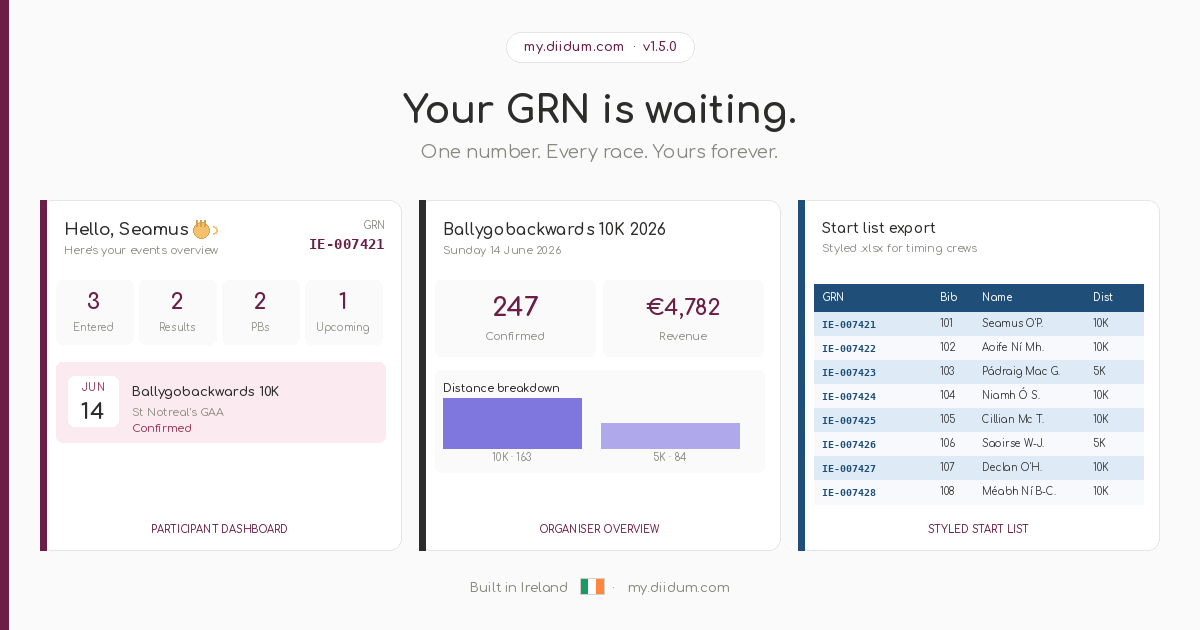
If you’ve entered one of our events over the past few years, you know the story — you register, you run, you get a result in an email or on a spreadsheet, and then it disappears somewhere. Your Kilmovee finish time is buried in an inbox. Your Carrowholly PB is written in a notebook. We’ve been thinking about how to fix that. Today, we’re launching something that does exactly that.
Introducing my.diidum.com
my.diidum.com is your personal participant portal — a single place where your entire event history lives, your results are tracked, and your personal bests are calculated automatically. It works alongside our registration platform at events.diidum.com, and it is completely free for all participants.
Already registered for an event?
Your account is already set up. Go to my.diidum.com, enter your registration email address, and we’ll send you a magic sign-in link. No password, no forms to fill out — just click the link and you’re in.
What’s inside
- My Events — see every event you’ve registered for, upcoming and past, with your confirmation status and a direct link to your ticket.
- Results — your finish times, positions, and splits, published automatically when organisers release results. You can also add your own time for any past event.
- Personal bests — your fastest times at every distance, tracked automatically and updated every time a new result comes in.
- Event discovery — upcoming events recommended for you based on your history, preferred distances, and county.
- Global Race Number — your permanent race identity, displayed on your dashboard and printed on your bib. Used by timing partners to deliver your results automatically.
680
Participant accounts
4
Events listed
Free
For all participants
How to get started
-
Go to my.diidum.com
Open the portal in any browser on your phone or computer. No app download needed — it works like an app directly from the browser, and you can add it to your home screen for instant access.
-
Enter your registration email
Use the exact email address you used when registering for your event. If you’re not sure which one, check your confirmation email from events.diidum.com.
-
Click your magic link
We’ll send you a secure sign-in link by email. Click it and you’re straight into your dashboard — your events and registrations will already be there.
-
Complete your profile
Add your county, club, and preferred distances to get personalised event recommendations and to make your results easier to find in public leaderboards.
Add results from any event
Official results from diidum events appear in your account automatically when organisers publish them. But you can also add your own time for any past event — including events that were not run through diidum.
Just go to My Events, find the relevant race, and click + Add result. Enter your hours, minutes, and seconds, add any notes about how the day went, and save. It counts towards your personal bests immediately.
“Whether you ran Kilmovee last Easter or a local 5K three years ago — your times belong in one place, not scattered across emails and spreadsheets.”
Your Global Race Number
Every participant on diidum Events now has a Global Race Number (GRN) — a permanent unique identifier in the format IE-XXXXXX. Your GRN is printed on your race bib and displayed on your dashboard. Timing partners use it to deliver your chip time directly to your account after every race, automatically.
If you were registered as part of a group booking, you can claim your own account at my.diidum.com/claim using your GRN from your bib.
What’s coming next
The organiser side of the portal is now live. Event committees can view participant lists, download start lists with GRNs, see revenue overviews, and manage communications directly from my.diidum.com/organiser.
We are also working on a full event discovery page within the portal itself, so you will be able to browse and register for upcoming events without leaving my.diidum.com. And for organisers looking to take payments directly, Stripe Connect integration is on the roadmap for later in 2026.
Organiser? Get in touch
If you run events and would like to list them on diidum — or get in touch about using the participant portal for your community — we’d love to hear from you at diidum.com/contact.
For now — go claim your account, find your Kilmovee time, and let us know what you think.